
|
Framework100% Free of Charge
Download Now
|
Pro VersionSingle Site / $89 USD
Buy Now
|
Pro VersionUnlimited Sites / $189 USD
Buy Now
|
|---|---|---|---|
PayPal Standard Button Integration |
|||
PayPal Pro Integration w/ Pro-Forms |
|||
Available to Merchants in the US, UK, and CanadaPlease see Product Availability for PayPal's "Website Payments Pro" service. Checkout Occurs on Your Site; via Pro-FormsPayPal Pro-Forms (instead of PayPal Standard Buttons). s2Member's PayPal Pro-Forms integrate seamlessly with WordPress Shortcodes. This allows you to keep customers on your site at all times, and it consolidates registration/checkout into a single step. Since checkout occurs on your site, you can dress up the Post/Page containing your Pro-Form in ways that are most effective for your product/service. You Can Accept the Following Forms of PaymentIf you choose to integrate with PayPal Pro, you can accept all major credit cards, plus any funding source supported by PayPal Express Checkout; i.e., a credit/debit card, the customer's PayPal balance, their checking account, and others—depending upon your PayPal account configuration. Full IPN Integration (Instant Payment Notifications)Instant Payment Notifications (IPNs) are messages (behind-the-scenes, via HTTP) that automatically notify s2Member about events related to PayPal transactions. s2Member uses this to automate back-office and administrative functions, like automatically fulfilling orders or terminating access when a customer cancels their subscription or forces a refund/chargeback. Built-in PayPal® Pro-Form Generatorss2Member's Pro-Form Generators (in your WordPress Dashboard) are so convenient! With these, you can establish a free trial period (or an initial fee), the cost & billing interval, whether it will be recurring, and much more. You can even set the Membership Level and add a list of any Custom Capabilities that you intend to bundle. Pro-Form Generators provided by s2Member produce a WordPress Shortcode that can be copied/pasted into a Post or Page in WordPress. Pro-Forms are, by far, the easiest way to implement on-site credit card processing. Supports "Buy Now" Products/ServicesYou can sell fixed-term or lifetime access using "Buy Now" functionality. The term, "Buy Now" indicates that it's a one-time fee that will not recur. This is a popular way to sell products/services with PayPal Pro, because "Buy Now" functionality does not require you to enable Recurring Billing in your Website Payments Pro account. Supports Recurring and Non-Recurring "Subscriptions"You can sell access that requires a recurring payment. If recurring payments fail too many times, access is terminated automatically by s2Member. Subscriptions support both Standard and Custom Recurrences. Or, you can sell access that is non-recurring; e.g., 6 days free, then $39 for 1 year of access—where access & billing are both terminated after the year is over; i.e. it is not recurring. Supports a Free or Paid Initial/Trial PeriodWith PayPal Pro you can set a free or paid initial/trial period of any length. For instance, $0.00 for the first X days/weeks/months/years, then $39/mo. An initial/trial period can be any length of time that you like; i.e. there is no limit to the length of an initial/trial period whatsoever. Supports Standard & Custom Subscription RecurrencesThe following Subscription Recurrences are supported by PayPal Pro-Forms: weekly, bi-weekly, monthly, quarterly, semi-yearly, and yearly. It is also possible to establish custom Subscription Recurrences by editing the s2Member Shortcode Attributes: Supports a Fixed Number of Billing RecurrencesBy default, recurring charges will remain ongoing until cancelled, or until payments start failing. However, it is possible (using the s2Member Supports Fixed-Term AccessFor example, access can be granted for exactly 7 days, 2 weeks, 1 year, etc. This is made possible by s2Member's Auto-EOT System. Fixed-term access can be sold as part of a non-recurring Subscription, or as a "Buy Now" purchase. It is also possible to establish a custom time-period by editing the s2Member Shortcode Attributes: Supports Lifetime AccessFor example, you can sell a recurring Subscription that never expires (i.e. not until the customer chooses to cancel). Or, you can generate a "Buy Now" Pro-Form that sells lifetime access to a product/service; i.e. a one-time fee that provides access that never expires. Supports "Buy Now" Access to Specific Posts/PagesThis is referred to as "Specific Post/Page Access"—customers are not required to register at all. Specific Post/Page Access is like selling a product—only, instead of shipping anything to the customer, you just give them access to a specific Post/Page on your site; one that you created in WordPress. A Specific Post/Page that is protected by s2Member might contain a download link for your eBook, access to file & music downloads, access to support services, etc. The possibilities with this are endless; so long as your digital product can be delivered through access to a WordPress Post/Page. You can also package multiple Posts/Pages together into one "Buy Now" transaction. Supports Independent Custom CapabilitiesIn addition to selling a Membership that already comes with Custom Capabilities—with PayPal Pro-Forms you can also sell additional (Independent) Custom Capabilities to existing members of your site. Independent Custom Capabilities are added to a customer's account immediately after checkout, and the customer will have the Custom Capabilities for as long as their membership lasts. Supports Coupon Code ConfigurationsWith PayPal Pro-Forms, you can build a configurable list of Coupon Codes that provide a flat-rate discount, or a percentage-based discount; up to and including 100% of the transaction amount (i.e., a 100% free checkout experience is possible). Coupons can be limited in scope too. Such as limiting the discount to the first/initial payment only, or to regular recurring payments only. It's also possible to limit Coupon Codes to specific Pro-Form instances, to specific customers, to specific dates, and even put a limit on the maximum number of times that a specific Coupon Code can be used collectively. It's also possible to integrate s2Member's Coupon Code functionality with affiliate platforms. Affiliates can be identified through promotions that use affiliate-specific Coupon Codes, which your Pro-Forms will graciously accept. Supports the Sale of Gift/Redemption CodesWith PayPal Pro-Forms, you can sell access to auto-generated Gift/Redemption Codes (using the Shortcode: Supports Virtual Terminal Transactions (Manual Payment Processing)You can accept offline payments (e.g., check by mail, funds collected in cash, by phone, etc). Customer accounts can be created from your WordPress Dashboard to fulfill orders, or through s2Member's Pro Remote Operations API. With PayPal Pro, you will also acquire a Virtual Terminal where you can process credit cards manually by logging into your PayPal Pro account. Supports Custom Thank-You Page URLsWith PayPal Pro-Forms, you can customize the |
|||
Stripe Integration w/ Pro-Forms |
|||
Available to Merchants in 18+ CountriesPlease see Product Availability for Stripe to learn more. Checkout Occurs on Your Site; via Pro-Formss2Member's Stripe Pro-Forms integrate seamlessly with WordPress Shortcodes. This allows you to keep customers on your site at all times, and it consolidates registration/checkout into a single step. Since checkout occurs on your site, you can dress up the Post/Page containing your Pro-Form in ways that are most effective for your product/service. You Can Accept the Following Forms of PaymentIf you choose to integrate with Stripe, you can accept almost any type of credit/debit card. See this article for further details. Full Integration w/ Stripe WebhooksWebhooks (aka: IPNs) are messages (behind-the-scenes, via HTTP) that automatically notify s2Member about events related to Stripe transactions. s2Member uses this to automate back-office and administrative functions, like automatically fulfilling orders or terminating access when a customer cancels their subscription or forces a refund/chargeback. Built-in Stripe® Pro-Form Generatorss2Member's Pro-Form Generators (in your WordPress Dashboard) are so convenient! With these, you can establish a free trial period (or an initial fee), the cost & billing interval, whether it will be recurring, and much more. You can even set the Membership Level and add a list of any Custom Capabilities that you intend to bundle. Pro-Form Generators provided by s2Member produce a WordPress Shortcode that can be copied/pasted into a Post or Page in WordPress. Pro-Forms are, by far, the easiest way to implement on-site credit card processing. Supports "Buy Now" Products/ServicesYou can sell fixed-term or lifetime access using "Buy Now" functionality. The term, "Buy Now" indicates that it's a one-time fee that will not recur. This is a popular way to sell products/services with Stripe. Supports Recurring and Non-Recurring "Subscriptions"You can sell access that requires a recurring payment. If recurring payments fail too many times, access is terminated automatically by s2Member. Subscriptions support both Standard and Custom Recurrences. Or, you can sell access that is non-recurring; e.g., 6 days free, then $39 for 1 year of access—where access & billing are both terminated after the year is over; i.e. it is not recurring. Supports a Free or Paid Initial/Trial PeriodWith Stripe you can set a free or paid initial/trial period of any length. For instance, $0.00 for the first X days/weeks/months/years, then $39/mo. An initial/trial period can be any length of time that you like; i.e. there is no limit to the length of an initial/trial period whatsoever. Supports Standard & Custom Subscription RecurrencesThe following Subscription Recurrences are supported by Stripe Pro-Forms: daily, weekly, bi-weekly, monthly, bi-monthly, quarterly, semi-yearly, and yearly. It is also possible to establish custom Subscription Recurrences by editing the s2Member Shortcode Attributes: Supports a Fixed Number of Billing RecurrencesBy default, recurring charges will remain ongoing until cancelled, or until payments start failing. However, it is possible (using the s2Member Supports Fixed-Term AccessFor example, access can be granted for exactly 2 days, 2 weeks, 1 year, etc. This is made possible by s2Member's Auto-EOT System. Fixed-term access can be sold as part of a non-recurring Subscription, or as a "Buy Now" purchase. It is also possible to establish a custom time-period by editing the s2Member Shortcode Attributes: Supports Lifetime AccessFor example, you can sell a recurring Subscription that never expires (i.e. not until the customer chooses to cancel). Or, you can generate a "Buy Now" Pro-Form that sells lifetime access to a product/service; i.e. a one-time fee that provides access that never expires. Supports "Buy Now" Access to Specific Posts/PagesThis is referred to as "Specific Post/Page Access"—customers are not required to register at all. Specific Post/Page Access is like selling a product—only, instead of shipping anything to the customer, you just give them access to a specific Post/Page on your site; one that you created in WordPress. A Specific Post/Page that is protected by s2Member might contain a download link for your eBook, access to file & music downloads, access to support services, etc. The possibilities with this are endless; so long as your digital product can be delivered through access to a WordPress Post/Page. You can also package multiple Posts/Pages together into one "Buy Now" transaction. Supports Independent Custom CapabilitiesIn addition to selling a Membership that already comes with Custom Capabilities—with Stripe Pro-Forms you can also sell additional (Independent) Custom Capabilities to existing members of your site. Independent Custom Capabilities are added to a customer's account immediately after checkout, and the customer will have the Custom Capabilities for as long as their membership lasts. Supports Coupon Code ConfigurationsWith Stripe Pro-Forms, you can build a configurable list of Coupon Codes that provide a flat-rate discount, or a percentage-based discount; up to and including 100% of the transaction amount (i.e., a 100% free checkout experience is possible). Coupons can be limited in scope too. Such as limiting the discount to the first/initial payment only, or to regular recurring payments only. It's also possible to limit Coupon Codes to specific Pro-Form instances, to specific customers, to specific dates, and even put a limit on the maximum number of times that a specific Coupon Code can be used collectively. It's also possible to integrate s2Member's Coupon Code functionality with affiliate platforms. Affiliates can be identified through promotions that use affiliate-specific Coupon Codes, which your Pro-Forms will graciously accept. Supports the Sale of Gift/Redemption CodesWith Stripe Pro-Forms, you can sell access to auto-generated Gift/Redemption Codes (using the Shortcode: Supports Virtual Terminal Transactions (Manual Payment Processing)You can accept offline payments (e.g., check by mail, funds collected in cash, by phone, etc). Customer accounts can be created from your WordPress Dashboard to fulfill orders, or through s2Member's Pro Remote Operations API. With Stripe, you will also acquire a Virtual Terminal where you can process credit cards manually by logging into your Stripe account. Supports Custom Thank-You Page URLsWith Stripe Pro-Forms, you can customize the |
|||
Authorize.Net w/ Pro-Forms |
|||
Available to Merchants in 5+ CountriesPlease see Product Availability for Authorize.Net to learn more. Checkout Occurs on Your Site; via Pro-Formss2Member's Authorize.Net Pro-Forms integrate seamlessly with WordPress Shortcodes. This allows you to keep customers on your site at all times, and it consolidates registration/checkout into a single step. Since checkout occurs on your site, you can dress up the Post/Page containing your Pro-Form in ways that are most effective for your product/service. You Can Accept the Following Forms of PaymentIf you choose to integrate with Authorize.Net, you can accept almost any type of credit or debit card. See this article for further details. Full Integration with Authorize.Net AIM/ARB and Silent PostsAIM (Advanced Integration Method) allows merchants to host their own secure payment form on a website, mobile device, etc., and send transactions to the payment gateway using an end-to-end secure sockets layer (SSL) connection. s2Member also support ARBs (Automated-Recurring Billing), and Silent Posts (aka: IPNs). Silent Posts are messages (behind-the-scenes, via HTTP) that automatically notify s2Member about events related to Authorize.Net transactions. s2Member uses this to automate back-office and administrative functions, like automatically fulfilling orders or terminating access when a customer cancels their subscription. Built-in Authorize.Net® Pro-Form Generatorss2Member's Pro-Form Generators (in your WordPress Dashboard) are so convenient! With these, you can establish a free trial period (or an initial fee), the cost & billing interval, whether it will be recurring, and much more. You can even set the Membership Level and add a list of any Custom Capabilities that you intend to bundle. Pro-Form Generators provided by s2Member produce a WordPress Shortcode that can be copied/pasted into a Post or Page in WordPress. Pro-Forms are, by far, the easiest way to implement on-site credit card processing. Supports "Buy Now" Products/ServicesYou can sell fixed-term or lifetime access using "Buy Now" functionality. The term, "Buy Now" indicates that it's a one-time fee that will not recur. This is a popular way to sell products/services with Authorize.Net. Supports Recurring and Non-Recurring "Subscriptions"You can sell access that requires a recurring payment. If recurring payments fail too many times, access is terminated automatically by s2Member. Subscriptions support both Standard and Custom Recurrences. Or, you can sell access that is non-recurring; e.g., 6 days free, then $39 for 1 year of access—where access & billing are both terminated after the year is over; i.e. it is not recurring. Supports a Free or Paid Initial/Trial PeriodWith Authorize.Net you can set a free or paid initial/trial period of any length. For instance, $0.00 for the first X days/weeks/months/years, then $39/mo. An initial/trial period can be any length of time that you like; i.e. there is no limit to the length of an initial/trial period whatsoever. Supports Standard & Custom Subscription RecurrencesThe following Subscription Recurrences are supported by Authorize.Net Pro-Forms: weekly, bi-weekly, monthly, bi-monthly, quarterly, semi-yearly, and yearly. It is also possible to establish custom Subscription Recurrences by editing the s2Member Shortcode Attributes: Supports a Fixed Number of Billing RecurrencesBy default, recurring charges will remain ongoing until cancelled, or until payments start failing. However, it is possible (using the s2Member Supports Fixed-Term AccessFor example, access can be granted for exactly 7 days, 2 weeks, 1 year, etc. This is made possible by s2Member's Auto-EOT System. Fixed-term access can be sold as part of a non-recurring Subscription, or as a "Buy Now" purchase. It is also possible to establish a custom time-period by editing the s2Member Shortcode Attributes: Supports Lifetime AccessFor example, you can sell a recurring Subscription that never expires (i.e. not until the customer chooses to cancel). Or, you can generate a "Buy Now" Pro-Form that sells lifetime access to a product/service; i.e. a one-time fee that provides access that never expires. Supports "Buy Now" Access to Specific Posts/PagesThis is referred to as "Specific Post/Page Access"—customers are not required to register at all. Specific Post/Page Access is like selling a product—only, instead of shipping anything to the customer, you just give them access to a specific Post/Page on your site; one that you created in WordPress. A Specific Post/Page that is protected by s2Member might contain a download link for your eBook, access to file & music downloads, access to support services, etc. The possibilities with this are endless; so long as your digital product can be delivered through access to a WordPress Post/Page. You can also package multiple Posts/Pages together into one "Buy Now" transaction. Supports Independent Custom CapabilitiesIn addition to selling a Membership that already comes with Custom Capabilities—with Authorize.Net Pro-Forms you can also sell additional (Independent) Custom Capabilities to existing members of your site. Independent Custom Capabilities are added to a customer's account immediately after checkout, and the customer will have the Custom Capabilities for as long as their membership lasts. Supports Coupon Code ConfigurationsWith Authorize.Net Pro-Forms, you can build a configurable list of Coupon Codes that provide a flat-rate discount, or a percentage-based discount; up to and including 100% of the transaction amount (i.e., a 100% free checkout experience is possible). Coupons can be limited in scope too. Such as limiting the discount to the first/initial payment only, or to regular recurring payments only. It's also possible to limit Coupon Codes to specific Pro-Form instances, to specific customers, to specific dates, and even put a limit on the maximum number of times that a specific Coupon Code can be used collectively. It's also possible to integrate s2Member's Coupon Code functionality with affiliate platforms. Affiliates can be identified through promotions that use affiliate-specific Coupon Codes, which your Pro-Forms will graciously accept. Supports the Sale of Gift/Redemption CodesWith Authorize.Net Pro-Forms, you can sell access to auto-generated Gift/Redemption Codes (using the Shortcode: Supports Virtual Terminal Transactions (Manual Payment Processing)You can accept offline payments (e.g., check by mail, funds collected in cash, by phone, etc). Customer accounts can be created from your WordPress Dashboard to fulfill orders, or through s2Member's Pro Remote Operations API. With Authorize.Net, you will also acquire a Virtual Terminal where you can process credit cards manually by logging into your Authorize.Net account. Supports Custom Thank-You Page URLsWith Authorize.Net Pro-Forms, you can customize the |
|||
ClickBank Button Integration |
|||
Available to Merchants in Most CountriesPlease see Countries Compatible w/ ClickBank Direct Deposit service. Checkout Occurs at ClickBank.comWith ClickBank (a hosted solution); customers do leave your site to complete checkout at ClickBank.com, and then they return to complete registration afterward. If you want to avoid this limitation use s2Member's PayPal Pro, Stripe, or Authorize.Net integrations, where Pro-Forms are used instead of Buttons, and registration/checkout are both completed in a single step at your site. You Can Accept the Following Forms of PaymentIf you choose to integrate with ClickBank, you can accept almost any type of credit or debit card, and you can also accept PayPal. See this article and/or contact ClickBank support for further details regarding accepted payment methods. Full IPN Integration (Instant Payment Notifications)Instant Payment Notifications (IPNs) are messages (behind-the-scenes, via HTTP) that automatically notify s2Member about events related to ClickBank transactions. s2Member uses this to automate back-office and administrative functions, like automatically fulfilling orders or terminating access when a customer cancels their subscription or forces a refund/chargeback. Full API & Thank-You Page IntegrationThe ClickBank API is a secure method to retrieve the details about a ClickBank transaction so that s2Member can process it in real-time (as checkout is completed); and without needing to wait for an IPN to occur silently behind-the-scenes. This works together with ClickBank's Thank-You Page functionality—a customer is immediately returned to your site after completing checkout at ClickBank. Built-in ClickBank® Button Generatorss2Member's Button Generators (in your WordPress Dashboard) are so convenient! With these, you can establish a free trial period (or an initial fee), the cost & billing interval, whether it will be recurring, and much more. You can even set the Membership Level and add a list of any Custom Capabilities that you intend to bundle. Button Generators provided by s2Member produce a WordPress Shortcode that can be copied/pasted into a Post or Page in WordPress. s2Member Pro-Forms work the same way. We recommend: Stripe Integration w/ Pro-Forms. Supports "Buy Now" Products/ServicesYou can sell fixed-term or lifetime access using "Buy Now" functionality. This is a popular way to sell products/services with ClickBank; i.e., a one-time fee that does not recur. With s2Member, this can be used to sell lifetime access. Or, you can limit the access to 1 day, 2 weeks, 6 months, or pretty much whatever is needed; powered by s2Member's Auto-EOT System. Supports Recurring and Non-Recurring "Subscriptions"You can sell access that requires a recurring payment. If recurring payments fail too many times, access is terminated automatically by s2Member. Subscriptions support Standard ClickBank Recurrences. Or, you can sell access that is non-recurring; e.g., 6 days free, then $39 for 3 months of access—where access & billing are both terminated after 3 months; i.e. it is not recurring. Supports a Free or Paid Initial/Trial PeriodWith ClickBank you can set a free or paid initial/trial period of any allowable length. For instance, $0.00 for the first X days, then $39/mo. An initial/trial period can be up to 31 days. To avoid this limitation use s2Member's PayPal Pro, Stripe, or Authorize.Net integrations, where Pro-Forms are used for on-site credit card processing. We recommend: Stripe Integration w/ Pro-Forms. Supports Standard ClickBank Subscription RecurrencesThe following Subscription Recurrences are supported by ClickBank Buttons: weekly, bi-weekly, monthly, quarterly. The minimum being weekly, the maximum being quarterly. To avoid this limitation use s2Member's PayPal Pro, Stripe, or Authorize.Net integrations, where Pro-Forms are used for on-site credit card processing. We recommend: Stripe Integration w/ Pro-Forms. Supports a Fixed Number of Billing RecurrencesBy default, recurring charges will remain ongoing until cancelled, or until payments start failing. However, it is possible (with ClickBank's Billing Duration feature) to terminate access & billing after X billing cycles. Please note that a fixed number of installments, also means a fixed period of access. If a customer's billing is monthly, and you set Billing Duration to Supports Fixed-Term AccessFor example, access can be granted for exactly 2 days, 2 weeks, 1 year, etc. This is made possible by s2Member's Auto-EOT System. Fixed-term access can be sold as a "Buy Now" purchase. It is also possible to establish a custom time-period by editing the s2Member Shortcode Attributes: Supports Lifetime AccessFor example, you can sell a recurring Subscription that never expires (i.e. not until the customer chooses to cancel). Or, you can generate a "Buy Now" Button that sells lifetime access to a product/service; i.e. a one-time fee that provides access that never expires. Supports "Buy Now" Access to Specific Posts/PagesThis is referred to as "Specific Post/Page Access"—customers are not required to register at all. Specific Post/Page Access is like selling a product—only, instead of shipping anything to the customer, you just give them access to a specific Post/Page on your site; one that you created in WordPress. A Specific Post/Page that is protected by s2Member might contain a download link for your eBook, access to file & music downloads, access to support services, etc. The possibilities with this are endless; so long as your digital product can be delivered through access to a WordPress Post/Page. You can also package multiple Posts/Pages together into one "Buy Now" transaction. Supports Independent Custom CapabilitiesIn addition to selling a Membership that already comes with Custom Capabilities—with ClickBank Buttons you can also sell additional (Independent) Custom Capabilities to existing members of your site. Independent Custom Capabilities are added to a customer's account immediately after checkout, and the customer will have the Custom Capabilities for as long as their membership lasts. Supports Pitch-Plus Upsell Flow Pathss2Member supports PitchPlus Upsells—a ClickBank-specific feature. Both PitchPlus Basic and PitchPlus Advanced are supported. This feature works best when you enable Open Registration with s2Member. Have your customers register (free) before completing checkout. This way upsell choices can be associated with their account in real-time, preventing multiple transactional emails that may conflict with one another—depending on which options were chosen in the Upsell Flow path. Again, this works best when you apply an Upsell Flow to a customer that is already registered. See: s2Member → General Options → Open Registration. Or, use a Pro-Form to facilitate free registration. Supports Custom Thank-You Page URLsWith ClickBank Buttons, you can use a custom Thank-You Page URL of your choosing whenever you create a Product at ClickBank. s2Member allows you to define a custom URL of your own (via |
|||
WordPress Roles/Capabilities/CCAPS |
|||
Seamless Integration with WordPresss2Member integrates seamlessly with an existing WordPress® concept that facilitates varying degrees of permission across different portions of a site or service (including the backend of WordPress itself). So Roles/Capabilities are not something new that s2Member introduces, it simply works with and customizes an existing WordPress community concept. s2Member Roles/Capabilities (Including bbPress/BuddyPress Support)When you install s2Member it adds some additional Roles and Capabilities to a default installation of WordPress. s2Member also makes extensive use of an existing Role in WordPress, the Subscriber Role. s2Member uses the Subscriber Role to classify Free Subscribers (i.e. people with an account—but they've not paid you anything yet). Or, maybe they have paid you for something in the past, but they were since demoted back down to the Subscriber Role (so they no longer have Membership privileges; i.e., Capabilities). s2Member Custom Capabilities (CCAPS)Custom Capabilities are for added flexibility. The WordPress function |
|||
Open Registration Option |
|||
Free/Open Registration (Enable/Disable)s2Member can lock-down all registration forms provided by WordPress and many of the most popular plugins/themes for WordPress. In this way, only paying customers can get an account. Or, you can choose to allow Open Registration; making it possible to acquire Free Subscribers that might later become customers by completing checkout and upgrading their account to a paid status. Free/Open Registration with Pro-Forms Requires s2Member Pros2Member Pro makes it possible to allow Open Registration using Pro-Forms of your choosing—even if you don't intend to use Pro-Forms or a payment gateway. Free Registration Pro-Forms can be used to acquire new users (regardless of your global Open Registration setting). They can also be used to configure a specific Membership Level, CCAPS, trial period, and more—specifically for Free Subscribers, and based on a specific Pro-Form instance. In this way, it is even possible to offer paid Membership Levels > 0 at no charge whatsoever, and maybe for a limited-time only. |
|||
Content Restriction Options |
|||
s2Member can Protect Anything/Everything in WordPressProtect WordPress Pages, Posts, a specific Post Type, all Posts of a specific Post Type, Tags, Categories, URIs, URI word fragments, URI Replacement Codes for BuddyPress, Specific Post/Page "Buy Now" access, Conditionals that test for Custom Capabilities, and even portions of content within Posts, Pages, themes, plugins. Easily configurable & highly extensible. You can even protect downloadable files and streaming audio/video with s2Member. Store files locally, or use s2Member's integration with Amazon® S3/CloudFront. |
|||
Alternative View Restrictions |
|||
Searches, Feeds, Comment Feeds, Custom Menus, Page Lists, and More!s2Member protects Categories, Tags, Posts, Pages, Files, URIs & more. However, even with all of those security restrictions, it's still possible for protected content excerpts to be seen through Custom Menus, XML feeds, in search results generated by WordPress, and/or (depending on your theme), possibly in other Archive views; which might include: Posts by Author, Posts by Date, a list of featured items formulated by your theme, or even through other widgets/plugins adding functionality to your site. ~ We refer to all of these collectively, as "Alternative Views". |
|||
Brute-Force Login Protection |
|||
Preventing Brute-Force Attacks Before They BeginAs with any membership system, it is possible for someone to try and guess username/password combinations by attempting a Brute Force Attack; whereby multiple/repeated logins are strategically attempted with various username/password combinations until a correct guess is made. It is not likely that you'll be attacked in this way, but it's still a good idea to protect your system; just in case somebody tries this. s2Member thwarts this behavior by monitoring failed login attempts that occur within a short period of time. Whenever s2Member detects an IP address (i.e., a remote user) that is consistently failing to enter a valid username/password, a temporary ban is created; preventing additional attempts from taking place for 30 minutes (configurable). This temporary ban, will only affect the offending IP address. |
|||
Unique IP Restrictions |
|||
Tracking Users by Their IP Address (Location)As with any membership system, it is possible for one member to signup, and then share their username with someone else; or even post it online for the whole world to see. This is known as link sharing (aka: username sharing). It is not likely that you'll be attacked in this way, but it's still a good idea to protect your system; just in case somebody tries this. |
|||
Security Encryption Key |
|||
Guarding Against Open Source PeepersJust like WordPress, s2Member is open-source software. Which is wonderful. However, this also makes it possible for anyone to grab a copy of the software, and try to learn their way around its security measures. In order to keep your installation of s2Member unique/secure, you should configure a Security Encryption Key. s2Member will use your Security Encryption Key to protect itself against hackers. It does this by encrypting all sensitive information with your key. A Security Encryption Key is unique to your installation. |
|||
Shortcode Conditionals |
|||
Quick Overview; Content Restriction + Simple Shortcode Conditionalss2Member makes it very easy to protect entire Posts, Pages, Categories, Tags, URIs, etc. This can be accomplished from the WordPress Dashboard using one of s2Member's global Restriction Options. Or, from your Post/Page editing station in WordPress you will find a meta box where Restrictions can be applied. We consider all of this to be point-and-click functionality. Very easy!
Scenarios where
|
|||
File Download Restrictions |
|||
Basic Download RestrictionsBy basic, we mean that you will let s2Member control access to any File Downloads that you make available. It's basic, because all you do is simply tell s2Member how many unique File Downloads are allowed within a given time-period, based on the Membership Level that a particular user has. For instance, you might make 100 ZIP files available, but you only allow Members at Level 1 to download a maximum of 10 unique files each day/week/month/year. Members at Level 2 might be allowed more, and so on. Advanced Download Restrictions (w/ Download Keys)By advanced, we mean that you take complete control over the availability of any File Downloads that you make available. s2Member makes it possible for you (as the site owner) to produce Download Keys (with help from the Protected File Download Storage (Local or Remote)s2Member can protect File Downloads locally ( Inline Delivery; Files are Not Always "Download Prompts"s2Member has the ability to deliver File Downloads with a download prompt, or not. Without the download prompt, a file can actually be served Inline; i.e., within the browser. This is a popular technique for images, PDF files, and audio/video files. See also: Protected Audio/Video Streams for additional considerations when serving audio/video streams. |
|||
Protected Audio/Video Streams |
|||
Audio/Video Files through Amazon S3/Cloudfront/JW Players2Member has an optional integration with Amazon S3, Amazon Cloudfront, and with JW Player. All of these services can be integrated with s2Member. Once that is complete, you will then have an easy-to-use Seekable (Non-Downloadable) RTMP Audio/Video StreamsOne of the great things about Amazon CloudFront, is its ability to stream/seek media files in the truest sense of the word. For sites delivering protected FLV, MP4, OGG, WEBM and other streaming audio/video file types over the RTMP protocol, Amazon CloudFront is our recommendation. Once you've successfully configured s2Member to use both Amazon S3 and Amazon CloudFront together, s2Member will automatically serve your protected files over the RTMP protocol using an Amazon CloudFront Streaming Distribution—configured automatically by s2Member. |
|||
Manual Account Creation |
|||
Offline Payments, Manual Account Creation, Virtual Terminal TransactionsYou can accept offline payments (e.g., check by mail, funds collected in cash, by phone, etc). Customer accounts can be created from your WordPress Dashboard to fulfill orders, or through s2Member's Pro Remote Operations API. With PayPal Pro, Stripe, or Authorize.Net, you will also acquire a Virtual Terminal where you can process credit cards manually by logging into your merchant account. |
|||
Custom Registration/Profile Fields |
|||
What are Custom Registration/Profile Fields?By default, s2Member only collects details from a user that are absolutely required to process a registration and/or transaction; e.g., email address, name, username, password, credit card, billing address, etc. If there are other fields that you'd like to introduce; either as part of the registration process, or as part of the user's profile at your site; Custom Registration/Profile Fields are an easy way to accomplish this. Custom Registration/Profile Fields are compatible with the built-in WordPress registration form, with s2Member Pro-Forms, and even with BuddyPress registration forms. See: WordPress Dashboard → s2Member → General Options → Custom Registration/Profile Fields for more information. Supported Custom Registration/Profile Field TypesText entry, multiline text entry, select menus that require a specific option, select menus that allow for multiple options, a single checkbox, multiple checkboxes, and multiple radio buttons. You can configure which Membership Levels they apply to, whether they are required, if they will be shown during checkout or only in a profile, if they should be for internal use only, if they begin a new section in the form, specific field validation patterns, styles, classes, and other HTML attributes of your choosing. |
|||
Custom Login/Registration Design |
|||
Styling the Default WordPress Login/Registration Systems2Member Pro provides a Pro Login Widget that integrates with a WordPress theme of your choosing, and Pro-Forms can be used for registration. However, the default WordPress login/registration system ( |
|||
Customizable Email Templates |
|||
Customization of Email Messages Sent by s2Members2Member makes it easy to build custom email messages that are sent in response to a customer completing checkout. You can customize the subject, body, and even the list of recipients. Replacement Codes are provided for added flexibility. For instance, you can insert the customer's name, email address, transaction/subscription ID, the amount charged, currency code, item number, item description, recurring rate, recurring term/cycle, initial/recurring amounts, coupon code, coupon affiliate ID, and any custom field values. Emails configured with s2Member also support the use of PHP and WordPress Template Tags; making it possible for advanced users to incorporate custom functionality if desirable. Which Transactional Emails Can I Customize?
Transactional Emails can be customized inside the s2Member Options for each payment gateway. For example, the transactional email templates for PayPal can be found in WordPress Dashboard → s2Member → PayPal Options. Customization of New User Notificationss2Member also makes it possible to customize the default New User Notifications that are processed by the WordPress core. There are two of these. One is sent to the user, and another is sent to the site owner. Replacement Codes are provided by s2Member for these email templates too. You can enable or disable this functionality, but the ability to customize these additional emails is a nice touch! The New User Notification templates can be found in WordPress Dashboard → s2Member → General Options → Email Configuration. |
|||
Custom Login Welcome Page |
|||
What Exactly is the Login Welcome Page?A Login Welcome Page (in the context of s2Member), is a Page you create in WordPress (like any other Page). Then you designate it as your Login Welcome Page when configuring s2Member. This can be configured (or reconfigured) under s2Member → General Options → Login Welcome Page. It's the page where a user/member (anyone who can log into your site) is redirected to upon logging in. Most Common Use of the Login Welcome PageOften times, the Login Welcome Page that you configure with s2Member will serve as a customer's "My Account" page, or something similar. Most site owners will use this page to introduce links to important areas of their site, so that users can gain access to whatever it is you've sold them. This makes it easy for a customer to find what they've purchased, and to locate information associated with their account. A Unique Login Welcome Page for Every User?Obviously, not every customer will have access to the same content or services you offer. Maybe you've restricted content with s2Member in different ways, at different Membership Levels, or with different Custom Capability packages. If someone logs into your site as a Free Subscriber, you might want to show a Free Subscriber something different than you show a Member at Level 1. If you always display links to content that requires Membership Level 1, but it's a Free Subscriber who logs in; those links may not work for them. So let's not show those links to a Free Subscriber. |
|||
Custom Membership Options Page |
|||
What is a Membership Options Page?A Membership Options Page (in the context of s2Member), is a Page you create in WordPress (like any other Page). Then you designate it as your Membership Options Page when configuring s2Member. This can be configured (or reconfigured) under s2Member → General Options → Membership Options Page. This page (always publicly available) serves two extremely useful purposes.
|
|||
Member Profile Modifications |
|||
Can Users Update their Own Profile?Yes. The Can Administrators Update User Profiles?Absolutely. Users can be edited/updated in various ways from your WordPress Dashboard at any time you like. See: WordPress Dashboard → Users. Find (or search for) a specific user and click [Edit] to access their WordPress profile, along with all of the editable fields provided by s2Member. |
|||
Mailing List Integrations |
|||
Pre-integrated List Servers (Mailing List Services)s2Member comes with the following list server integrations that are all ready-to-go.
Features Supported by All List Server Integrations
Additional Features Supported by MailChimp Integration
Integrating Another Mailing List Service of your Choosings2Member's event-driven API Notifications (via email, or through HTTP communication behind-the-scenes), make it possible for all sorts of 3rd-party service integrations. If you have a developer to assist you, please take a look at: WordPress Dashboard → s2Member → API / Notifications. Here you will find additional details and options intended for advanced site owners. |
|||
Affiliate Program Integrations |
|||
Recommended Affiliate Management Platformss2Member recommends the following affiliate applications/services.
Integrating Another Affiliate Platform of your Choosings2Member's event-driven API Notifications (via email, or through HTTP communication behind-the-scenes), make it possible for all sorts of 3rd-party service integrations. If you have a developer to assist you, please take a look at: WordPress Dashboard → s2Member → API / Notifications. Here you will find additional details and options intended for advanced site owners. |
|||
bbPress/BuddyPress Integrations |
|||
Forum Software w/ a Twist; from the Creators of WordPressThe bbPress™ plugin (forums/topics/replies) integrates seamlessly with WordPress and s2Member. If bbPress was already installed when you activated s2Member, your s2Member Roles/Capabilities are already configured to work in harmony with bbPress. If you didn't, you can simply click the "Update Roles/Capabilities" button; see: WordPress Dashboard → s2Member → Other Integrations → bbPress. That's all it takes. Once your Roles/Capabilities are updated, s2Member and bbPress are fully integrated with each other. Social Networking Software; from the Creators of WordPressThe BuddyPress™ plugin (for social networking functionality) integrates seamlessly with WordPress and s2Member. BuddyPress is a powerful plugin that takes your WordPress-powered site beyond the blog with social-network features like user profiles, activity streams, user groups, and more. BuddyPress comes with several components that integrate directly with your site, with each other, and even with other plugins (like s2Member). |
|||
Compatible w/ Caching Plugins |
|||
Comet Cache™, WP Super Cache, W3 Total Cache, and Otherss2Member has been thoroughly tested against all of the most popular caching plugins for WordPress. These include, but are not limited to: Comet Cache™, WP Super Cache, W3 Total Cache, and WP Rocket. When dynamic content is processed by s2Member, all of the appropriate runtime constants are defined by s2Member; i.e., the flags needed to keep it fully compatible with caching plugins for WordPress. Comet Cache™ Developed by the Creators of s2Member ProIf you definitely want to use a caching plugin for WordPress, but you're not sure which would be the best, go with Comet Cache™. It's super easy to install, highly effective, and it was developed by the creators of s2Member; i.e., it works in complete and total harmony with all s2Member features—without any additional configuration needed whatsoever. Avoid Object Caching Plugins WarningPage caching is highly recommended. Object caching—not so much. In particular, the W3 Total Cache plugin is known to cause problems with the WordPress Transient API whenever Object Caching is enabled. If you choose to install W3 Total Cache and run this alongside s2Member, that's fine! Just remember NOT to enable the Object Cache; i.e., leave that part off please. |
|||
Security Badge/Certificate |
|||
We Take Security Seriously ~ and We're Proud of It!An s2Member® Security Badge (optional), can be used to express your site's concern for security; demonstrating to all users/members that your site (and the s2Member® software) takes security seriously. To qualify your site, you will need to enable s2Member's Security Badge Status API, and then generate a Security Encryption Key in your Dashboard—with s2Member installed as an active plugin. Also, there are a few additional requirements. Some of the requirements pertain to WordPress security in general, and some of the requirements are s2Member-specific. What we want to see is that you've made an effort to tighten security on your installation of WordPress by following guidelines presented by s2Member. Your site and your users will be safer as a result. |
|||
Event-Driven API/Notifications |
|||
API Notifications / Webhooks AdvancedIf you use affiliate software, or have back-office routines that need to be notified whenever a registration occurs, when payment transactions (including recurring payments) take place; or when cancellations, refunds, chargebacks occur; s2Member's event-driven API Notifications can be used. s2Member's API Notifications will send data to Webhooks that you build (or that come with services you're integrating). Webhooks allow you to build or set up integrations that subscribe to certain events that occur in s2Member. When one of those events is triggered, s2Member will send an HTTP payload to any number of Webhook URLs that you've configured. For example, Webhooks can be used to update a sales chart, stats regarding user signups, or other custom post-processing routines that might exist outside of WordPress. |
|||
API Functions/Constants |
|||
Building a Theme or Plugin that Works Together with s2Member Advanceds2Member's API Functions are for developers (or advanced site owners) to use in projects of their own. These make it easy to integrate s2Member with themes and other plugins. Everything from permissions, to details about each user, and even a few utility methods. We recommend using s2Member's API Functions, API Constants, or Hooks/Filters (over 1000 spread throughout all of s2Member's codebase) to complete an advanced integration. Note... please try to refrain from using other internal classes/methods/constants whenever possible; as those are subject to change from one release to the next. Conversely, the availability of API Functions, API Constants, and Hooks/Filters will remain from one version to another. Only in rare circumstances would we ever remove one of these key elements. If we do, backward compatibility would always remain when the previous version is deprecated for whatever reason. Other Useful Functions in the WordPress Core Advanced |
|||
WordPress Hooks/Filters |
|||
Hacking s2Member® Via Hooks/Filters AdvancedIf you need to add custom processing routines, or modify the default behavior of existing processing routines; please use an s2Member Hook or Filter for WordPress. Hooks & Filters give you the ability to "hook into", and/or "filter" processing routines with files/functions of your own—instead of editing the s2Member plugin files directly. This way you won't need to merge your tweaks each time a new version of s2Member is released. What Hooks/Filters are Available?There are more than 1000 Hooks/Filters spread throughout s2Member's codebase. While we work to document each of these, you can search our Knowledge Base for tips/tricks. Also, you can search the s2Member source code for |
|||
Optimized Codebase |
|||
Highly Organized Codebase w/ SPL Class Autoloadings2Member has quite a large codebase with a lot of powerful features and flexibility. With so much to maintain (and more importantly), with so many files to be loaded into WordPress; it becomes extremely important for the application to be optimized in every way possible. One of the most important things that the s2Member codebase deals with is OOP design combined with PHP Autoloading. Unlike many other themes/plugins for WordPress, s2Member makes extensive use of SPL Autoloading functionality in recent versions of PHP. In this way, the only parts of s2Member that are loaded at runtime, are those which are required to perform a specific action that is being requested of s2Member. In short, only a small handful of s2Member's codebase is actually loaded at any given time. This reduces s2Member's footprint down to a bare minimum. Many sites running the s2Member Pro software can do so with just 32M of RAM. That covers WordPress, s2Member, a custom theme, and many other plugins too. Having said that, it is suggested that you dedicate at least 64MB of RAM to your installation of WordPress—just to give it plenty to work with. See this article if you'd like to learn more. |
|||
Access to Source Code |
|||
I Gain Access to ALL of the Source Code? ~ Even the Pro Version?That's right! We are firmly against locking the source code of any application. Like WordPress itself, both s2Member and s2Member Pro are released under a GPL license. You are free to modify and adapt these applications to meet your needs, or the needs of your clients. The source code for the s2Member Framework (i.e., the free version) is publicly available at WordPress.org and at GitHub. |
|||
One-Step Registration/Checkout |
|||
Choosing a Payment Gateway that Supports s2Member Pro-FormsPayPal Buttons in the free version of s2Member are great, but registration comes after checkout—it's a multistep process. With s2Member Pro you can integrate with PayPal Pro, Stripe, or Authorize.Net and take full advantage of s2Member Pro-Forms. Pro-Forms consolidate registration/checkout into a single step that occurs always on your site. It's quicker, easier, and better-er-er. |
|||
Unlimited Paid Membership Levels |
|||
Four Membership Levels Not Enough?The s2Member Framework (the free version) is limited to a maximum of 4 paid Membership Levels. With s2Member Pro you can create and label an unlimited number of Membership Levels. Of course, you can also use Custom Capabilities for added flexibility—where Custom Capabilities are not associated with any incremental access like WordPress Membership Levels are. |
|||
Powerful Pro-Form Shortcodes |
|||
Quick Overview (Pro Forms vs. Buttons)s2Member Pro comes with "Pro-Forms"—shortcodes that generate Registration/Checkout Forms, and other kinds of forms too. In contrast, the free version of s2Member does not come with Pro-Forms. In the free version of s2Member you have "Payment Buttons" only. Payment Buttons lead visitors away from your site to complete checkout at your payment gateway, whereas Pro-Forms keep visitors on your site at all times, and you will have full support for on-site credit card processing. Why Should I Use Pro-Forms Instead of Buttons?Increased conversion rates! Not all customers like PayPal. Also, with s2Member Pro you're keeping customers on your site throughout the entire checkout process. You can control the surrounding elements on the page, the flow of events, and do a better job at building confidence in your products/services. Pro-Forms can dramatically increase sales! Best of all, they're super easy to integrate thanks to s2Member Pro Shortcodes. If that's not enough, Pro-Forms also allow you to configure Custom Tax Rates, Coupon Codes, and even to sell Gift/Redemption Codes. These advanced features are only possible with s2Member Pro-Forms. Choosing a Payment Gateway that Supports s2Member Pro-FormsPro-Forms work with PayPal Pro, Stripe, or Authorize.Net. You'll want to select one of those payment gateways if you intend to take full advantage of s2Member Pro-Forms. It's quicker, easier, and better-er-er. |
|||
Free Registration Pro-Forms |
|||
Free/Open Registration (Enable/Disable)s2Member can lock-down all registration forms provided by WordPress and many of the most popular plugins/themes for WordPress. In this way, only paying customers can get an account. Or, you can choose to allow Open Registration; making it possible to acquire Free Subscribers that might later become customers by completing checkout and upgrading their account to a paid status. Free/Open Registration with Pro-Forms Requires s2Member Pros2Member Pro makes it possible to allow Open Registration using Pro-Forms of your choosing—even if you don't intend to use Pro-Forms or a payment gateway. Free Registration Pro-Forms can be used to acquire new users (regardless of your global Open Registration setting). They can also be used to configure a specific Membership Level, CCAPS, trial period, and more—specifically for Free Subscribers, and based on a specific Pro-Form instance. In this way, it is even possible to offer paid Membership Levels > 0 at no charge whatsoever, and maybe for a limited-time only. |
|||
Anti-spam Security Measures |
|||
Taking Measures to Prevent Spam Bots from RegisteringIf you plan to allow Open Registration, this is extremely important. Spam bots surf the Internet every minute of every day—just looking for ways to create free accounts and/or spoof their identity. If you open your site to Free Registration (of any sort), you can expect to find lots of this; unless you are wise & take the proper precautions. |
|||
Simultaneous Login Monitoring |
|||
Prevent Customers from Sharing their UsernameAs with any membership system, it is possible for one member to signup, and then share their username with someone else; or even post it online for the whole world to see. This is known as username sharing. It is not likely that you'll be attacked in this way, but it's not a bad idea to protect your system; just in case somebody tries this. |
|||
Content Dripping Shortcodes |
|||
What is Content Dripping Exactly?Content Dripping is the gradual, pre-scheduled release of premium website content to paying members. This has become increasingly popular, because it allows older members; those who have paid you more, due to recurring charges; to acquire access to more content progressively, based on their original paid registration time. It also gives you (as the site owner), the ability to launch multiple membership site portals, operating on autopilot, without any direct day-to-day involvement in a content release process.
Using
|
|||
Import/Export Tools |
|||
Import/Export Users, Members, Metadata, and Plugin Optionss2Member Pro comes with two sets of import/export tools. Both of these use structured CSV file formats.
Coming from Another Membership Platform?s2Member's Advanced Import/Export Tools, coupled with s2Member's Auto-EOT System can save the day! You can import all of your existing customers and provide them with access to your new site and services. In addition, if you import them with an EOT (End-Of-Term) Time, you can preconfigure the EOT for their account; based on their status in your previous membership platform. Import/Export s2Member Plugin Options?This can be a huge time-saver. s2Member is a comprehensive membership platform. Therefore, there are many configurable options. If you purchase an s2Member Pro Unlimited-Site License, you can run s2Member Pro on multiple sites. In this scenario, you could simply configure one instance of s2Member, export your configuration, and then import those config. options into your next site. |
|||
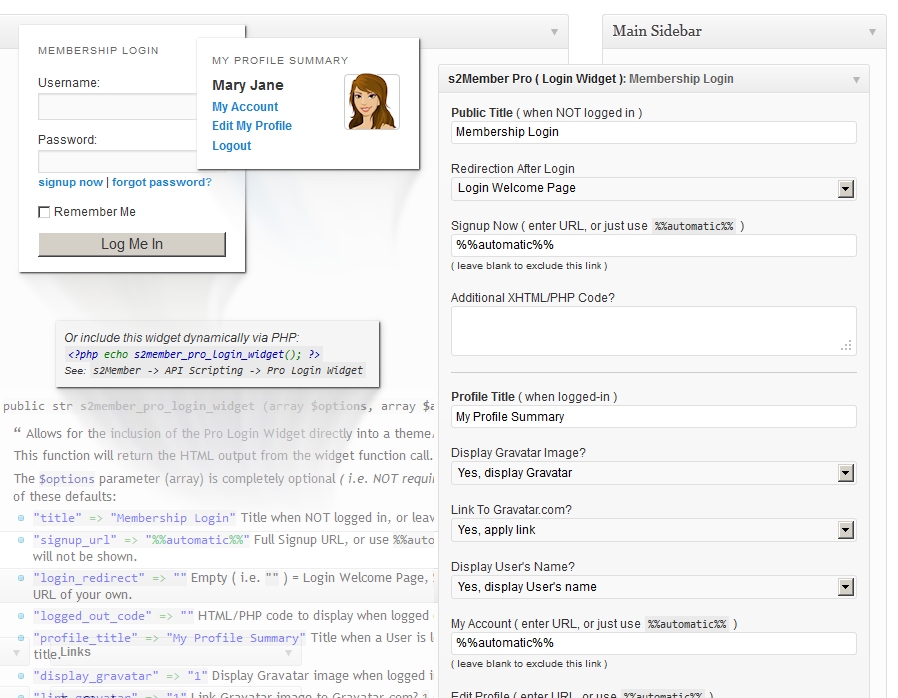
Pro Login Widget/Summary |
|||
Drag n' Drop Login Widget Integrates w/ s2Member Functionality
Tip: The s2Member Pro Login Widget can also be integrated into a theme/plugin file with the PHP Template Tag: |
|||
Coupon Code Configurations |
|||
Using Coupon Codes to Attract a Higher Sales VolumeWith PayPal Pro, Stripe, and Authorize.Net (i.e., with any of these payment gateways that work with s2Member Pro-Forms), you can build a configurable list of Coupon Codes that provide a flat-rate discount. Or, a percentage-based discount; up to and including 100% of the transaction amount (i.e., a 100% free checkout experience is possible). Tracking the Use of Promotional Coupon Codess2Member Pro tracks the total number of times that each Coupon Code is used. This information is displayed alongside each Coupon Code in your WordPress Dashboard. s2Member Pro also records each Coupon Code that a customer uses, attaching this information to their account record within WordPress. This is nice for many reasons, but it also makes it possible for the data to be exported, and then analyzed carefully before you start your next set of promotions. |
|||
Gift/Redemption Codes |
|||
Sell Gift/Redemption Codes (i.e., Gift Certificates or Group Redemption Codes)With PayPal Pro, Stripe, and Authorize.Net (i.e., with any of these payment gateways that work with s2Member Pro-Forms), you can sell access to auto-generated Gift/Redemption Codes (using the Shortcode: |
|||
Public Members List |
|||
Building a Custom Member Directorys2Member Pro makes light of this. You can use the
Most Popular Use Cases for
|
|||
Shortcode Extras |
|||
Overview of WordPress Shortcodes Provided by s2MemberThroughout s2Member, there are several WordPress Shortcodes exposed. These allow you to integrate small bits of functionality into a WordPress theme of your choosing. s2Member's Shortcodes are an easy way to add additional membership-specific features and functionality to an existing WordPress theme. Because, while they do come with a few default structural styles, they automatically inherit styles/colors provided by your theme—making integration much more seamless. Shortcode Enhancements (New Shortcode Attributes)When you have s2Member Pro, many of the shortcodes that come with the s2Member Framework (i.e., the free version) will support new attributes. For example, with s2Member Pro you'll be able to use the Shortcodes that Only Come w/ s2Member ProIn addition to shortcode enhancements, s2Member Pro also adds a few pro-only shortcodes. Such as: |
|||
Multisite Network Support |
|||
Multisite Network Compatibility Built Right In! Requires Unlimited-Site LicenseMost sites running s2Member use a standard WordPress installation. However, WordPress also supports another flavor of itself (requires advanced config. changes), and this is referred to as a Multisite Network. A Multisite Network allows you to run multiple blogs/sites under a single set of WordPress installation files, and with a single database. s2Member has been thoroughly tested with both Standard and Multisite Network installations of WordPress. Multisite Network Support always requires an Unlimited-Site License—no exceptions. Running Multiple Instances of s2Member in a Network AdvancedThis always requires an Unlimited-Site License, because a Single-Site License of s2Member Pro supports only a single instance of WordPress (i.e., one instance of s2Member only). If you purchase an Unlimited-Site License, s2Member Pro can be activated Network-wide, making it possible for you to have multiple child blogs (aka: sub-sites); each with their own user base and membership offering. Sharing Users/Members Across Multiple Child Sites in a Networks2Member was designed to support a separate user base for each child blog/site in a Multisite Network. However, the underlying |
|||
Customizable Pro-Form Templates |
|||
100% Optional; Pro-Forms Integrate w/ WordPress ShortcodesCustomizing Pro-Form template files is usually NOT necessary, because Pro-Forms inherit styles introduced by a WordPress theme of your choosing. Pro-Forms come fully functional. They work as-is in most WordPress themes. If you need to tweak their appearance, most site owners accomplish this through custom CSS alone. Again, modification of Pro-Form templates is not necessary in most cases. Customizable PHP Template Files for All Pro-Forms AdvancedWith the above in mind, if you'd like to create custom Pro-Form templates, please check your |
|||
Remote Operations API |
|||
Remote Communication w/ s2Member Pro AdvancedWith s2Member Pro installed, you have access to the s2Member Pro API for Remote Operations. This is made available for developers that wish to create user/member accounts dynamically through custom scripts of their own. s2Member's Remote Operations API requires a secret API Key in order to POST authenticated requests to your installation of s2Member. To acquire your API Key, with s2Member Pro installed see: WordPress Dashboard → s2Member Pro → API / Scripting → Remote Operations API What Actions Can I Perform Remotely?
For full PHP code examples, see s2Member Pro API for Remote Operations. |
|||
WooCommerce (Learn More) |
|||
Planning to use WooCommerce?s2Member can be used with WooCommerce on the same installation, there shouldn't be any conflicts. s2Member isn't fully integrated with WooCommerce, though, but it's still possible to use them together to some extent. For example, you can use s2Member to restrict access to any page served by WordPress, using s2's URI Restriction, which lets you specify a level requirement for any URL that has a certain word or string of characters, for example. This can be applied to WooCommerce pages, of course. |
|||
|
|
Framework100% Free of Charge
Download Now
|
Pro VersionSingle Site / $89 USD
Buy Now
|
Pro VersionUnlimited Sites / $189 USD
Buy Now
|


As I prepare to initiate my first significant product launch (after several years of learning and experimenting with various product and website setups) it feels so great to have my site built on solid components like s2Member. You and your staff have been fantastic in helping me to resolve any issues that I had with my setup. I am confident, both in the system itself, and in the support that stands behind it. Thanks for going over the top. I appreciate it!
Randy Pipes w/ Life Development Services, LLC

Open Source + Lifetime Updates
Buy the software and it's all yours, including access to the source code. That means if your developer needs to review the s2Member source code or help you with an issue you're having, they have access to all of the source code. Also, there are NO recurring charges, NO limit on the number of members you can build-up over time. Plus you get free lifetime access to updates; i.e., future versions of the software.
Single-Site vs. Unlimited-Site License
Single-Site License: This is good for one instance of s2Member® Pro. Perfect for site owners with one domain name. Loaded with all Pro features at an affordable rate — it's a popular choice for many. It also includes free lifetime access to future releases of the software.
Multisite Networks: Please note that if you run a WordPress® Multisite Network with s2Member Pro active on multiple (i.e., more than one) child blog or sub-site within your Network (regardless of whether you use sub-domains or sub-directories), this will always require our Unlimited-Site License. This is because s2Member Pro runs as a separate instance on each child blog or sub-site in the Network. To clarify, a Single-Site License does NOT provide support for multiple child blogs or sub-sites, even if they do run within a single Multisite Network installation of WordPress®. A Single-Site License is valid for one instance only.
Unlimited-Site License: This works for an unlimited number of s2Member® Pro instances. Perfect for site owners with multiple domain names, or for those who operate a WordPress Multisite Network installation. Each of your s2Member Pro instances must be installed/activated on domains that you own & operate; e.g., you cannot buy an Unlimited-Site License and use it on client sites that you do not own.
If you're a developer: Your clients will need to purchase their own Single-Site and/or Unlimited-Site License. We don't support s2Member® Pro instances on domains that you do not own and operate yourself. This also gives your clients access to future releases through an account they'll acquire at our website. It's the approach we suggest for all developers working w/ clients needing s2Member Pro.
Getting Help w/ s2Member® Pro
All support is provided by volunteers through community interaction, and all of the s2Member Pro source code is open and available for your developer to review. We also work very hard to provide you with lots of supporting documentation, KB articles, videos, FAQs, our codex, and links to many other resources throughout our knowledge base. However, we don't offer support beyond this. You can also post in the community forum, where you can interact with others who use the product. Tip: If you require dedicated technical assistance, you can get help from experienced freelancer developers who have worked extensively with s2Member on many client projects.
s2Member® Pro Refund Policy
We're committed to building the best software for WordPress and we stand by our work. The following policy outlines what is required to qualify for a refund. Note that s2Member Pro is delivered as an open-source digital item (i.e., it is irrevocable software that comes with a GPL license, much like WordPress itself). For this reason, refunds are granted at our sole discretion, and on a case-by-case basis.
Qualifying for a Refund Within 14 Days
If you're having trouble, we ask that you work with and follow all advice presented by our team/community in an effort to resolve the issue (e.g., attempting to reproduce problems in a clean installation of WordPress). If problems still exist, even when testing in a clean installation of WordPress, we will gladly refund your money within 14 days from the date of purchase.
Refund requests may take up to 14 days to process. Refunds are not guaranteed. All refunds will be granted at the sole discretion of s2Member staff. Absolutely no refunds will be given after 14 days from the original purchase. Please note that by purchasing s2Member Pro, you agree to the terms & conditions of use, including this refund policy.
Testing in a Clean Installation Required: WordPress offers you lots of options! As a site owner you have the ability to mix our Products with other plugins and a theme you like best. This means your environment will be slightly different than ours. Your WordPress installation has different plugins, it has had a different history, and it's probably running with a different theme too.
As you can imagine, testing every feature in s2Member against every possible combination of plugins, and with each and every theme and server configuration that exists for WordPress, is simply not realistic. We need common ground! In fact, our policy is that we require it. Before any refund is granted we ask that you attempt to reproduce the issue in a clean installation of WordPress.
Well, if I haven't said it before I'll say it now, I LOVE YOU GUYS! This is amazing software!
Michael w/ Avatar Publication